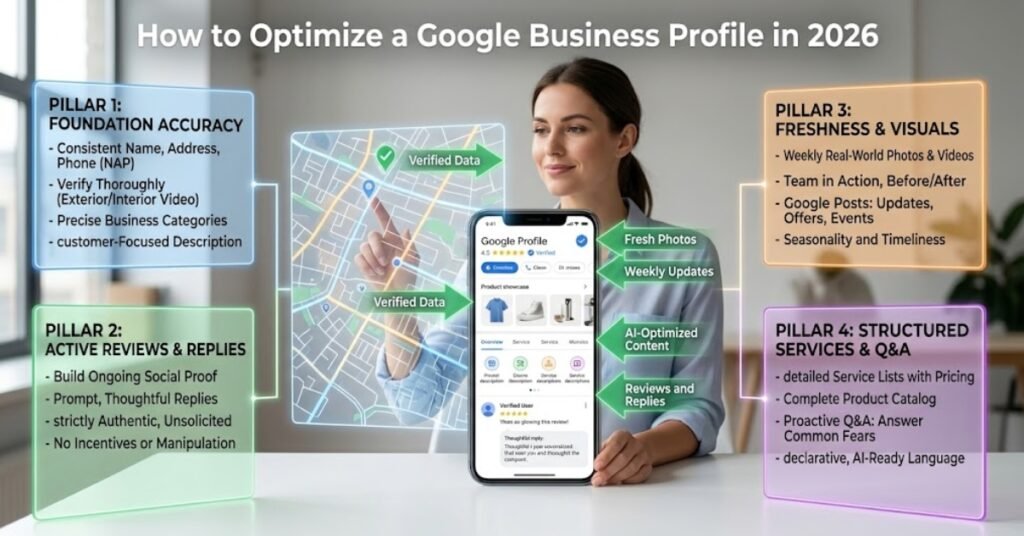
To optimize a Google Business Profile in 2026, complete every field and choose the most accurate primary category. Then earn a steady stream of recent reviews, add fresh photos often, and post updates every week. These signals tell Google your business is active, relevant, and close to the searcher, which is what wins a spot in the Map Pack. A finished, well-run profile now drives more calls and direction requests than most websites do.
This guide walks through each step in plain order. You will learn how to claim and verify your listing, pick the right categories, and fill out every part of the profile. It also covers how to use reviews and photos to rank higher, post to stay active, and get ready for AI search. Real data from Whitespark, Google, and BrightLocal backs every recommendation.
Why Your Google Business Profile Matters More in 2026
Your profile is often the first thing a customer sees, before your website ever loads. When someone searches a service like “plumber near me,” Google shows three map listings first. All three come from Business Profile data, not from websites.
The weight of these signals is clear in the numbers. The Whitespark 2026 Local Search Ranking Factors survey asked 47 local SEO experts to score 187 factors. It found that Google Business Profile signals make up 32 percent of Local Pack ranking weight. That is the single largest factor group, ahead of reviews at 20 percent and on-page signals at 15 percent. Eight of the top ten Local Pack factors come straight from the profile itself.
The stakes have grown with AI search too. BrightEdge research found that AI Overviews appeared on about 48 percent of tracked queries as of February 2026, up from 31 percent a year earlier. Google now often builds an answer before any listing loads, and it pulls that answer from complete, well-managed profiles. A thin or stale listing gets skipped in both the Map Pack and the AI answer.
Completeness pays off in trust as well. Google reports that businesses with complete profiles receive 70 percent more location visits. They are also 2.7 times more likely to be seen as reputable than those with missing information.
Claim and Verify Your Profile First
You cannot optimize a profile you do not control. Start by claiming your listing at google.com/business and completing verification. Google may verify by phone, email, video, or postcard depending on your business type.
Until your profile is verified, you cannot edit key fields or respond to reviews. If a listing for your business already exists but someone else claimed it, request ownership through Google. If the profile does not exist yet, create it and follow the verification prompts.
Once verified, do not change your business name, address, or phone number without care. Sudden edits to these fields can trigger a re-verification or, in some cases, a suspension.
Choose the Right Primary Category
Your primary category is the most important choice you make. The Whitespark 2026 survey named it the single highest-weighted relevance factor for the Local Pack. It decides which searches your profile is even allowed to compete for.
Pick the category that matches your core service most exactly. A business listed as “Roofing Contractor” competes for roofing searches. If that same business chooses “Contractor” instead, it becomes eligible for a broader but weaker set of queries and loses ground on the searches that matter most.
To find the best category, search your main keyword in an incognito Google Maps window and study the top three profiles. Note the categories they use. Google shows a business its primary category, so you can often confirm what your strongest competitors picked.
Add Secondary Categories
After the primary, add every secondary category that genuinely fits a service you offer. A painting company might add “Cabinet Painting” and “Drywall Contractor” alongside its primary “Painter” category. Do not add categories for services you do not provide. Google can flag mismatches, and irrelevant categories dilute your relevance rather than widen it.
Fill Out Every Part of Your Profile
A half-finished profile leaves ranking and trust on the table. Every field is a chance to match more searches and answer more questions. Work through this checklist and leave nothing blank.
| Profile Section | What to Do | Why It Helps |
|---|---|---|
| Business name | Use your real name, exactly as it appears on signage | Keyword stuffing here risks suspension |
| Categories | One accurate primary, plus fitting secondaries | Decides which searches you compete for |
| Description | 750 characters covering services and service area | Reinforces relevance in plain language |
| Services | List each service with a short, clear description | Matches long-tail and question searches |
| Products | Add products with photos and prices where relevant | Adds surface area in Search and Maps |
| Hours | Set regular and holiday hours accurately | Open at search time is a top-five factor |
| Attributes | Fill every true attribute, such as “wheelchair accessible” | Feeds filtered and AI-driven searches |
| Phone and website | Match your website and citations exactly | Consistency is a core trust signal |
| Service area | List the cities and areas you actually serve | Sets your ranking radius correctly |
Keeping hours accurate carries real weight. The Whitespark 2026 survey ranked “business is open at the time of search” as the fifth most important Local Pack factor. A profile marked closed when a customer searches can slip in the rankings for that moment.
How to Use Reviews to Rank Higher
Reviews do two jobs at once. They convince customers to choose you, and they act as a direct ranking signal that Google measures closely. In the Whitespark 2026 data, review signals carry 20 percent of Local Pack weight, second only to profile signals.
Volume still matters. Combined BizIQ and BrightLocal benchmarking found that top three Local Pack businesses average more than 200 reviews. That is well above the roughly 39 reviews of a typical local business. But raw count is no longer the whole story.
Recency has become one of the strongest levers. Whitespark founder Darren Shaw calls review recency one of his top five ranking factors, and surveys show most consumers only trust reviews from the last few months. A profile with fresh, specific reviews now often beats a competitor sitting on a pile of old ones.
Here is a simple system that works for most service businesses:
- Ask every happy customer for a review the same day you finish the job.
- Send a direct review link by text or email to remove friction.
- Respond to every review within 24 to 48 hours, positive or negative.
- Keep a steady pace rather than chasing a large batch all at once.
Owner responses matter more than many owners think. Replying to reviews signals an active profile and gives you room to naturally mention the service and city, which reinforces relevance without stuffing.
Add Photos and Keep Them Coming
Photos are not decoration. They are one of the most powerful and most ignored conversion tools on a profile.
According to BrightLocal data, businesses with 100 or more photos see a huge jump in engagement. They receive 520 percent more calls, 2,717 percent more direction requests, and 1,065 percent more website clicks than the average listing. That gap is large enough to treat photo volume as a core task, not an afterthought.
| Photo Type | What to Upload | How Often |
|---|---|---|
| Exterior | Storefront, signage, entrance, parking | A few at setup, refresh yearly |
| Interior | Workspace, waiting area, showroom | A few at setup, refresh yearly |
| Team | Real staff at work | Every few months |
| Work samples | Before and after, finished jobs | Weekly or after each job |
| Products | Clear shots with good light | As inventory changes |
Upload real, original photos rather than stock images. In 2026, Google reads the content of your photos to understand what you do, so genuine job photos reinforce your categories and services. Aim to add new images every month so the profile keeps signaling activity.
Post Every Week to Stay Active
An active profile ranks better than a static one, even when both are complete. Google now appears to weigh freshness and engagement more heavily, and many local SEO practitioners report that profiles left untouched for 30 or more days see impressions slip.
Google Posts are the easiest way to stay active. Use them to share offers, seasonal updates, new services, events, and job photos. Native post scheduling is now available, which makes a weekly habit far easier to keep. A good target is one post per week, each with a clear photo and a short call to action.
Keep your Q&A and messaging current as well. Google has been reshaping how questions and chat work on profiles through 2026, including new AI-driven answers and added messaging options. Whatever the exact feature set on your profile, the principle holds. Answer questions quickly and keep every channel you turn on responsive.
Get Your Profile Ready for AI Search
AI answers now sit between the searcher and your listing. Google’s AI Overviews, along with tools like Gemini, ChatGPT, and Perplexity, increasingly recommend specific businesses by name. The businesses that get named are almost always the ones with complete, well-managed profiles and consistent data across the web.
Three moves make your profile easier for AI to read and cite:
- Keep your name, address, and phone number identical everywhere online. Inconsistent details across directories cause AI systems to skip a business when they build local answers.
- Write clear, specific services and a plain-language description. AI pulls structured, direct information far more reliably than vague marketing copy.
- Encourage detailed reviews. AI now summarizes review themes, so specific feedback about your service and results produces a stronger summary than a wall of “great place” comments.
Aligning your website with your profile helps here too. A matching services page and clean local schema give AI a consistent source to trust. This overlap between local search and AI answers is why AI search optimization has become part of a complete local strategy rather than a separate project.
Track What Actually Matters
Optimization without measurement is guesswork. Google’s Performance tab shows how customers find and interact with your profile, and the actions matter more than raw views.
| Metric | What It Tells You |
|---|---|
| Calls | Intent to consult, book, or buy |
| Direction requests | Intent to visit in person |
| Website clicks | Research before deciding |
| Searches | Whether people find you by name or by service |
| Discovery share | Whether new customers are finding you |
A profile with 500 views and 40 direction requests performs better than one with 5,000 views and 50 requests. Watch the ratio of actions to views, not the view count alone. A healthy target is at least a 5 percent action rate across all actions combined.
To see where you actually rank across your service area, a geo-grid scan is the clearest tool. It shows your position at many points on a map, not just from one spot, so you can see the real shape of your visibility. This kind of tracking sits at the center of good Google Business Profile optimization because it turns ranking work into plain, provable numbers.
Common Mistakes That Hurt Your Ranking
A few habits quietly hold profiles back. Avoid these:
- Stuffing keywords into your business name, which risks a suspension.
- Choosing a broad category instead of the exact one that fits your service.
- Letting reviews go stale or ignoring them entirely.
- Hiding your address as a service-area business, which can shrink or misplace your ranking radius.
- Leaving hours wrong, so you show as closed when customers search.
- Uploading nothing new for months, so the profile looks inactive.
- Running different name, address, or phone details across other sites.
Fixing these often produces movement faster than any single new tactic, because each one removes a signal that was working against you.
Final Thoughts
Optimizing a Google Business Profile in 2026 comes down to a simple loop. Complete every field, choose the most accurate categories, earn recent reviews, add fresh photos, post weekly, keep your data consistent, and track your actions. Do these well and the profile keeps earning the signals that win the Map Pack and feed AI answers.
Most profiles show measurable movement within 30 to 60 days of a proper rebuild, and the work compounds over time. If you would rather have a specialist handle the rebuild and tracking, Rashid Muneer can help. He offers a full profile optimization service built around geo-grid data and plain reporting, as part of a wider local SEO approach. To see where you rank right now, request a free audit and get a clear picture of your service area before you change a thing.